
Control health
Some activities get completed on time and in one pass. Others need three reminders, get rejected twice and gets submitted a week late. Until now, that difference was invisible in the activity list: everything simply showed as completed.
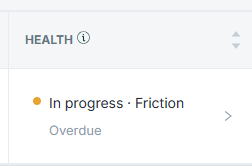
Control Health makes the difference visible. A new Health column on the activity list gives each activity a friction status based on what actually happened during its lifecycle. It sits next to Status: where Status tells you where an activity is right now, Health tells you whether there's been back-and-forth getting there.
Each activity is classified across two independent dimensions:
-
Quality: was the activity performed cleanly, without rejections or reopens?
-
Punctuality: was the activity performed on time?
The severity level reflects how many dimensions are affected:
-
Clean: neither dimension is affected - the activity moved through its lifecycle without friction.
-
Friction: one dimension is affected - for example, rejections during review, or an overdue completion.
-
High friction: both dimensions are affected - for example, an overdue activity that also had rejections along the way.
Control Health is objective. It flags observable facts without judging how serious they are. Some teams treat rejections as healthy QA, others as a red flag. Control Health surfaces the signal; you decide what it means for your operations.
Activity timeline showing reasoning for the health
Clicking a Health cell opens a timeline showing the full history for that activity: when it was created, when it was first opened, every reminder, every submission, every review decision and every reassignment, in order and with dates.
When an activity is running late, the timeline also shows the exact step it's waiting on and who owns it - the "Waiting on" boxes at each stage turn orange when a step went past its due date. Instead of emailing people to ask why an activity is stuck, you can see the bottleneck directly and follow up with the right person.
The timeline is also useful when you're preparing documentation for an audit, or when you need the factual sequence of events for a specific control.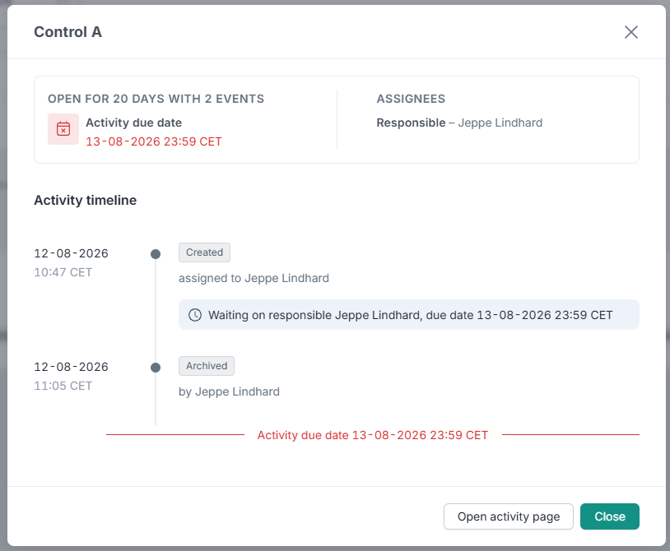
New filtering model in the activities list
Impero now uses a more user friendly filtering format in the activities list.
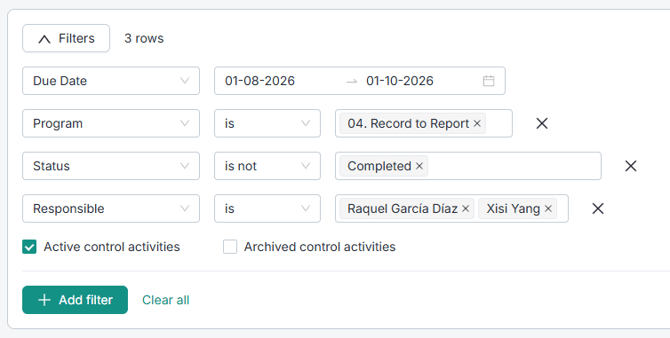
Key benefits:
- Instant, no-save filtering - Filters apply the moment a value is selected. The list, row count and any charts refresh immediately; there's no Submit or Save step.
- Broaden or narrow the results - Add several values to one filter criteria to broaden results (e.g. Edit or Admin access); add different filter criteria to narrow them down, since the result must match every criteria.
- Uncover archived and active results on demand - With the checkboxes it is now easy to decide whether the view should cover active or archived activities or even both.
- Search works alongside filters, not instead of them - Search only looks within what the filters have already returned.
- Permission-aware - Filters never surface results a user couldn't already see.
Note: From this release on, your previous set filters will disappear, and you have to set the desired filter settings from scratch again. If you need any assistance with this, please reach out to Impero Support or your CSM.
Tip: If you're opening a link that was bookmarked or shared before this release, it will still take you to the previous version of the list, which continue to work exactly as before. It is encouraged to update links in order to always make use of the newest functionality.
Entity management improvements
Organizations using entity management will see several improvements to previous releases:
- People who get access to controls through an entity can now use the dashboard and see the status of the activities that belong to them.
- Anyone with access to several entities can now narrow the dashboard down to a single entity, instead of looking at everything at once. This makes the dashboard more user friendly to users who oversee many entities but work on one at a time.
- Entity is now available in the reports as a filter, as a column and as a grouping, so a report can be sliced per entity. Excel exports follow whatever filter is applied.
- Programs or controls that contain many entities now only show the first couple of entities in lists in order to make the lists more overviewable. A clickable number is shown instead; when clicked the whole list of entities appear.
Unarchive activities
Archiving an activity used to be a one-way action: getting an activity back required a request to Impero. Admins and anyone with edit access to a control program can now unarchive activities themselves, both individually and in bulk from the activity list. 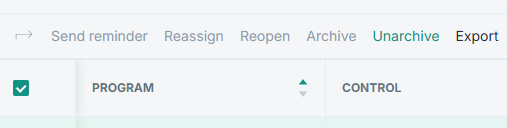
User friendly notification preferences
Impero sends a range of emails: new activities, reminders, review requests, reassignments and more. Not every user wants all of them, and inbox noise is one of the most common reasons emails get ignored.
Users can now manage their own notification preferences and opt out of specific categories of email notification. Admins can see and manage notification preferences for the users in their organization, so they can help users who are receiving more emails than they need.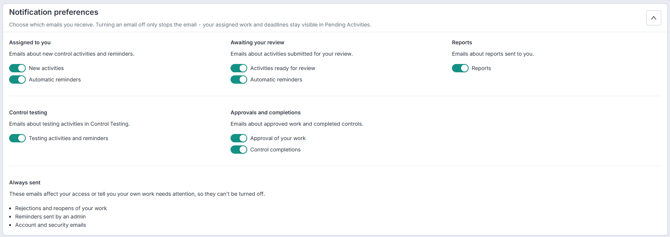
Additional improvements:
Enhancing insights of residual risks
The Risk Insights AI summary now includes a residual view, so the summary covers changes to residual risk values alongside the inherent picture. This makes it easier to see whether mitigation efforts have actually had an effect.
Email reminders differentiate between manual and automatic reminders
You can now see in the email notification which user sent a reminder to you. The user can also include a note for the receiver.
Activity logs shows who made reassignments
You can now see which user who made a reassignment of a control activity. The information is stated in the activity log.
Reviewer status split
Activities waiting for review are no longer shown under a single review status. First review and final review are now separate statuses in the activity table, so you can see whether an activity is waiting for its first reviewer or has already passed first review and is waiting for the final reviewer.