
Instead of manually reviewing historical snapshots, you can now visually and structurally see how risks have changed over time - directly within the Risk Map.
The Insights tab combines:
- A visual comparison map (impact × likelihood)
- A structured comparison table
- Clear indicators for value movement, new risks, and removed risks
When to use the Insights tab
The Insights tab is especially useful when:
- Performing regular risk reassessments (e.g., annually or biannually)
- Preparing documentation for audits
- Reviewing how risk exposure has evolved
- Identifying newly emerging risks
- Tracking whether mitigation efforts have changed exposure
How It Works
At the top of the Insights tab, select Start date and End date
The comparison is always calculated as: End date compared to start date
The visual comparison map
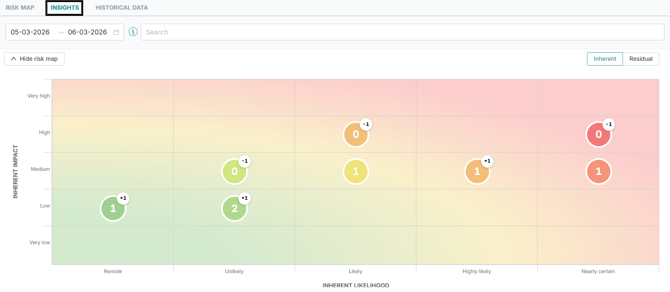
The risk map displays the positions of risks based on:
- Impact (vertical axis)
- Likelihood (horizontal axis)
Each bubble shows:
- The number of risks currently positioned in that quadrant (based on the end date)
- A small delta indicator showing how the count has changed since the start date. Example: +2 → Two more risks in this quadrant compared to the earlier date
The map supports both Inherent view and Residual view. You can toggle between them at any time.
The comparison table
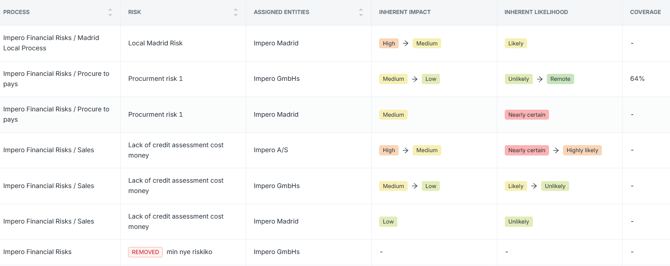
The table below the map shows detailed value comparison per risk. It reflects the selected dates and the selected view (inherent or residual).
Value Comparison Logic
When a risk exists in both selected dates:
-
Value changed
Displayed as [old value] → [new value]

-
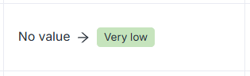
Value introduced
If the risk had no value in the earlier date but has one in the later date:
No value → [value]
-
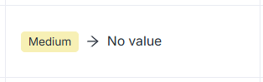
Value removed
If the risk had a value earlier but no longer has one:
[value] → No value
-
No change
If the value did not change:
[value]

-
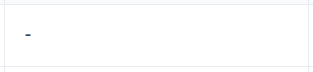
No value in both periods
If no value exists in either date:
[–]
New and Removed Risks
The Insights tab clearly distinguishes between value changes and structural changes.
New Risk
A risk is marked as New when:
- It did not exist on the start date
- It exists on the end date
Display behavior:
- Marked with a New label
- Shows only the later date values
Removed Risk
A risk is marked as Removed when:
- It existed on the start date
- It does not exist on the end date
Display behavior:
- Marked with a Removed label
- Shows only the earlier date values

Filtering Behavior
All existing Risk Map filters continue to work in the Insights tab. You can filter by:
- Risk title
- Process
- Entity
- Tags
- Heat map categories
Filtering affects:
- The map
- The comparison table
The comparison logic always reflects the currently visible filtered data.
Inherent vs Residual View
You can toggle between Inherent and Residual, the map and table update accordingly.
All comparisons are calculated based on the selected view.
Important Notes
- Both comparison dates must be selected.
- The dates cannot be the same.
- If no differences exist between the two dates, the map and table will reflect no changes.
- If no data is available for the selected dates, the view will indicate this accordingly.
Summary
The Insights tab enables you to:
- Compare two points in time directly
- Identify movement in risk scores
- Detect new and removed risks
- Track how inherent or residual exposure has evolved