The Impero MCP will connect Impero to the AI assistant you use at work, such as Microsoft Copilot, Claude or ChatGPT. You will be able to ask about your controls in your own words and get answers based on live data from Impero. You will also be able to prepare changes directly from the AI assistant, like sending a reminder or reassigning work, but nothing will be saved in Impero until you confirm it.
Note! The Impero MCP is currently in beta with a small, selected group of customers and can't be switched on for other organizations yet. General availability is planned for the end of Q1 2027.
What is an MCP?
MCP stands for Model Context Protocol. It's an open standard that lets AI assistants connect securely to other systems.
You may know Impero's API, which lets systems such as Power BI exchange data with Impero. The MCP does the same for your AI assistant. You connect once with your normal Impero login, and from then on, the assistant finds what it needs in Impero based on what you ask.
What will I be able to do with the Impero MCP?
Ask about your work. Your assistant can read the same things as you have access to in Impero, such as activities, submitted answers, evidence files, control setup, Control Health and risks. For example:
- “What's waiting for my review this week?”
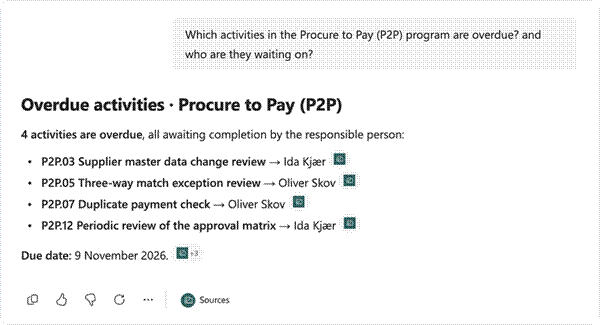
- “Which activities in the Procure to Pay (P2P) program are overdue, and who are they waiting on?”
- “Check the submissions waiting for my review and tell me if any evidence is missing.”
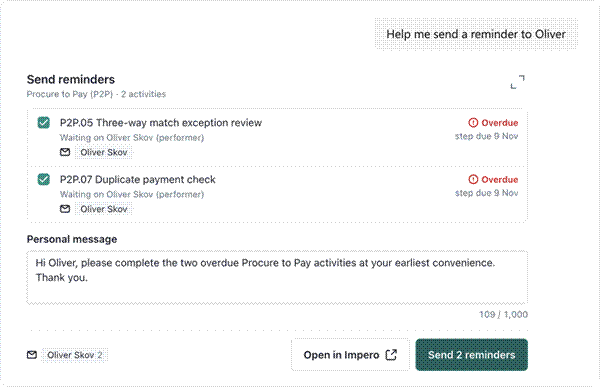
Move work forward. When something in Impero should change, an Impero panel opens in the chat. Your assistant fills it in, and you check it and confirm. You will be able to:
- Send reminders, extend due dates and reopen completed activities
- Reassign open work to a colleague
- Prepare a review or fill in your own control activity
- Draft a new control from a policy or a description
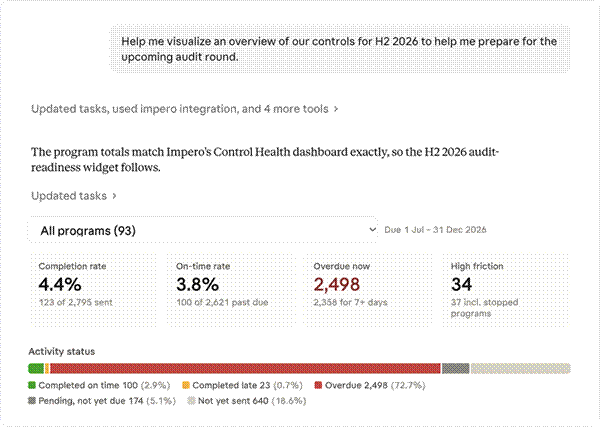
Combine Impero with your other tools. Your assistant can use your Impero data together with your email, documents and other tools. You could ask it to draft a follow-up email to everyone with overdue work, or to build an overview of your controls before an audit.
How do I stay in control?
Like Impero Assist, the Impero MCP is AI assisted and human validated.
- It sees what you see. Your assistant works with your own Impero roles and access rights, and your Impero admin decides who can connect.
- Nothing changes until you confirm. Impero's usual rules, such as segregation of duties and mandatory tasks, still apply. Approving or rejecting a review is always the reviewer's decision.
- Every change is logged. Confirmed changes show in the audit trail under your name, marked as made through an AI agent.
- Sensitive actions stay in Impero. Deleting data, managing users and roles, security settings and API keys aren't available through the MCP.
How can I get access?
The MCP is currently in beta with a small group of customers and is not accessible for general availability. During the beta, the early access group use the Impero MCP in their daily control work and help us decide what goes into general availability.
If you would like to know more about the Impero MCP for your organization, please reach out to your Customer Success Manager or to support@impero.com.
Frequently asked questions
-
Does Impero keep my conversations or use my data to train AI models?
No. The Impero MCP doesn't keep a copy of your Impero data or your chat history, and Impero doesn't use your data to train AI models. Your conversations in the AI assistant are covered by your organization's agreement with its provider. -
Does the Impero MCP decide whether a control is done correctly?
No. Impero teaches your assistant how the platform works, but what counts as complete or correct is up to you, for example through your own checklist. -
When will the Impero MCP be available to everyone?
General availability is planned for the end of Q1 2027. Until then, it's only available to the customers in the beta.
Learn more: