
Before you can run controls across entities, you need to create the entities themselves and decide how they're organized. A bit of planning here pays off later: a clean structure makes access control, filtering, and reporting far easier as you add more entities.
Note! You need to be an entity administrator, or an overall Impero admin, to create or delete entities.
Before you start: plan your structure
Decide two things up front:
-
Granularity - will an entity represent a legal company, a department, a location, or a combination? Base this on how you report and govern, and on whether control execution is centralized or local.
-
Identifiers and tags - agree a consistent set before you create entities. Inconsistent or duplicate tags are the main thing that makes large entity setups hard to filter and manage later.
How do I create an entity?
-
Click Entities in the left menu.
-
Click Create entity in the upper right corner.
-
Enter a name - use a unique, consistent identifier (e.g. "Company 100", "Danish Operations").
-
Add a description explaining the entity's purpose and scope.
-
Set the entity's tags - tick the ones that apply, such as company, country, region, or whether it's part of a shared service. These make the entity easier to find and report on later.
-
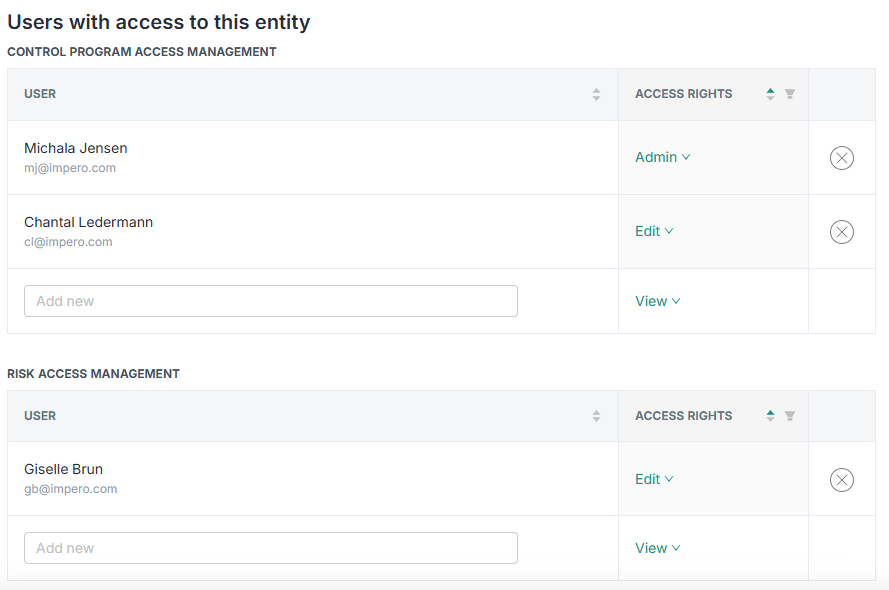
Assign access rights to the relevant users. You can do this both for controls and risks, and you can assign either Admin, Edit, or View access to users.
-
Click Create entity to save.
Find entities in the list
The Entities list shows every entity you've created. With a large estate you can:
-
Filter the list - for example, by country or region.
-
Quick search - type a term like "Denmark" to narrow the list fast.
Learn more: