
As an Impero user, you can receive several different types of emails: reminders, review requests, completion notices, and more. Notification preferences let you choose which of these emails you want to receive.
Note: Turning off an email doesn't remove the underlying activity. Anything assigned to you, waiting on you, or overdue still appears in Pending Activities inside Impero — notification preferences only control what lands in your inbox.
How do I access my own notification preferences?
-
Open My Profile from anywhere in the solution.
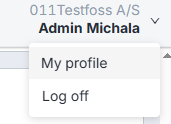
-
Scroll down to Notification preferences.
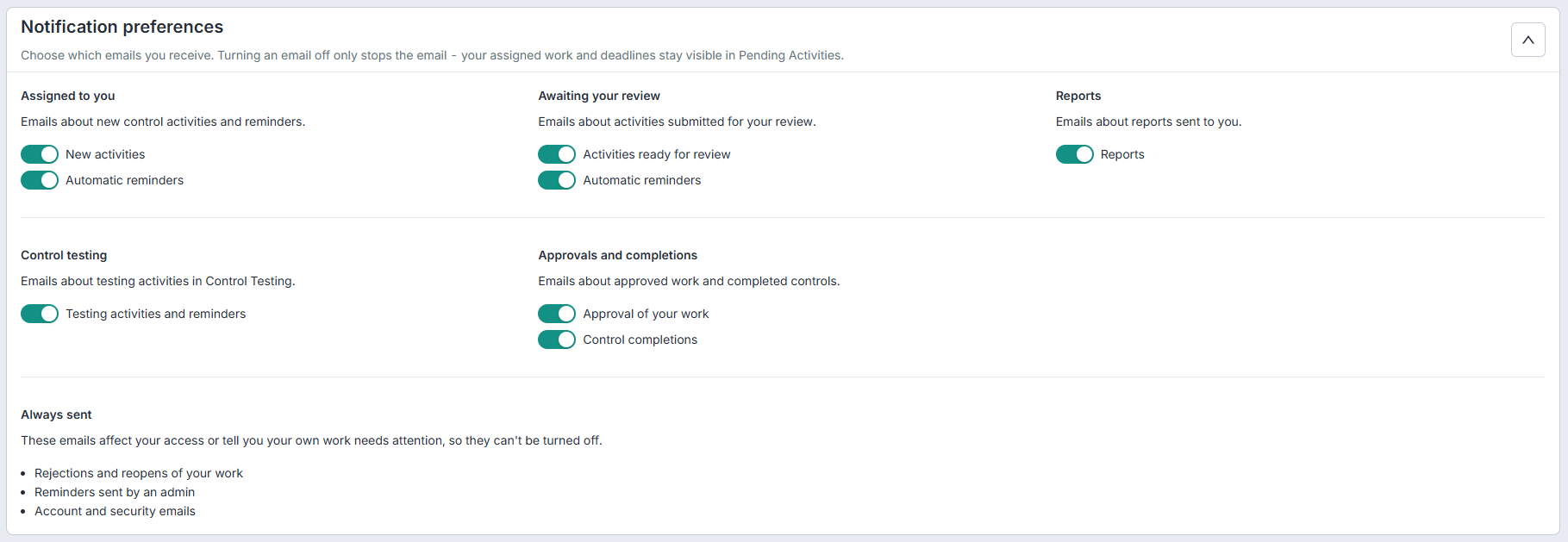
- Toggle any category on or off. Changes are saved automatically.
How do I set up other users notification preferences?
Organisation admins can view and edit another user's preferences from the User Management.
-
Select the user and click on it.
-
Scroll down to Notification preferences.
- Toggle any category on or off. Changes are saved automatically.
Note: Every change is recorded in the audit event log, with the actor and target captured separately.
What kind of notifications can I opt out of?
Preferences are grouped by the kind of work the email is about. Each group contains one or more toggles.
Assigned to you - emails about new control activities and
reminders.
- New activities: You're notified when a new control activity is assigned to you.
- Automatic reminders: Reminders as the due date approaches or passes.
- Activities ready for review: You're notified when a responsible submits work for your review.
- Automatic reminders: Reminders while the review is still pending.
- Testing activities and reminders: Assignments and reminders for testing you're responsible for.
- Approval of your work: Sent when a reviewer approves work you submitted.
- Control completions: Sent when a control you're watching is completed.
- Reports: All report emails delivered to you.
What kind of notifications are always sent?
Some emails can't be opted out of because they're either critical to the workflow or personally addressed. These appear in a read-only block below the toggles.
Learn more: