
Entity-level access rights let you give users access to a specific entity rather than a whole control program, so local managers, regional owners, and external auditors only get what's relevant to them. This article explains the access levels and how to assign them.
Note: You need Admin access on an entity or an overall admin role to manage its access rights.
The three access levels
The access rights for entities are split the same way as elsewhere in Impero: View, Edit and Admin.
-
View: Can see everything for the entity, but can't change anything.
-
Edit: Can see and edit everything for the entity - including managing assignments on attached controls (who performs and reviews, for that entity).
-
Admin: Can see and edit everything for the entity, plus the ability to grant other users access to the entity. Granting access is the one thing that separates Admin from Edit.
Crucially, none of these levels lets a local user change a control's design, so title, description, tags, scheduling and tasks stay locked to the central framework. Edit/Admin users can only change the assignment details for their own entity. That's what makes "centrally governed, locally managed" work.
How do I assign access to an entity?
- Click on Entities in the left menu and open an existing entity or create a new one.
- Go to the section "Users with access to this entity" and add users to controls and risks respectively.
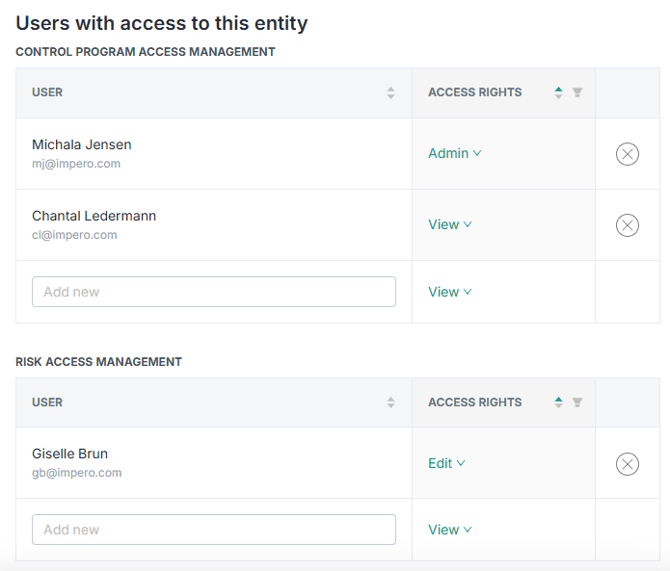
- Choose the users access rights; View, Edit, or Admin.
A user only sees the entities - and the control programs - they've been granted access to. Everything else stays hidden.
Usage examples
Grant the income tax manager of a company access to the entity
To ensure that the manager of certain subsidiary has access to centrally created and predefined income tax controls - not to change them but simply to assign them to individual members of her team within her company - you can grant this manager editor or administrator rights for the relevant entity. Now add this entity to the overall income tax control programme. The manager will then be able to add the relevant responsibles and reviewers into the central controls without being able to alter the control tasks or the schedule. And this without being able to view the assignments and control activities of other other entities within the same control.
Give an external auditor access to one entity
To let an external auditor see only your German entity's controls: create (or use) the entity for that German subsidiary, and grant access rights to the auditor - View access will ensure that the auditor only can see the content. When the auditor logs in, the user can only see data related to this specific German entity - no other entity's data is exposed.
Note: Entity access doesn't replace control-program access - you can grant either or both, depending on what a user needs. The goal is more flexibility in how you scope access, not a forced switch.
Learn more: